Introduction
So you have heard everyone talking about ChatGPT, maybe even opened it once or twice, typed something in and thought, "okay now what?" You are not the only one. Most beginners open the chat box and freeze, not because they are not capable, but because nobody ever showed them where to start.
ChatGPT isn't just for coders or tech experts, this is the truth. It's useful for everyday activities, writing a tricky email, planning a week's meals, prepping for a job interview. In this article, we will walk through real, practical ways beginners are already using it, so you can skip the guess work and start putting it to work today.
What you will learn:
· Everyday writing help: drafting emails, texts and messages (professional & personal)
· Writing job applications, CVs & cover letters
· Basic prompting prompts
· How to do follow up questions and avoid mistakes
· How to develop ChatGPT skills through practice
What you can use ChatGPT for:
1. Learning difficult subjects
ChatGPT can explain topics at different levels.
For example:
“Explain unemployment as if I am 10 years old.”
Then ask:
“Now explain it at university level.”
You can request examples, quizzes or revision notes.
Useful prompts include:
Teach me the basics of Microsoft Excel in seven lessons
Explain this concept using an everyday example
Create a ten-question quiz based on the explanation.
“Show me where my answer is wrong without giving me the correct answer immediately.”
ChatGPT should support your learning rather than replace your thinking.
2. Writing professional emails
You can use ChatGPT to draft:
· Application emails
· Follow-up emails
· Leave requests
· Meeting requests
· Complaint messages
· Customer-service replies
Example:
“Write a polite email to my supervisor requesting annual leave on 10 and 11 August. Mention that I will complete urgent work before leaving. Keep it under 120 words.”
Always check the names, dates and commitment before sending.
3. Improving your CV
ChatGPT an help you:
· Improve your professional summary
· Rewrite job responsibilities
· Identify unclear wording
· Match your CV to a job advertisement
· Check grammar
· Suggest stronger action verbs
· Organise skills
Example:
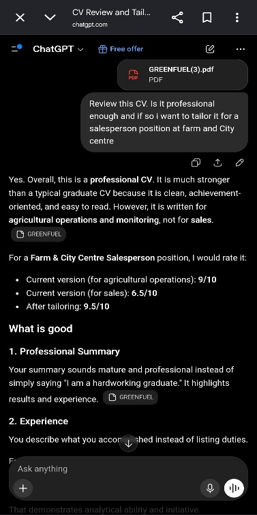
“Review this CV. Is it professional enough and if so I want to tailor it for a salesperson position. Identify the relevant experience already present in my CV and suggest clearer wording. Do not invent skills, qualifications and achievements.”
Personally, I use ChatGPT to improve my CV and make it ATS friendly. The screenshot below shows how you can upload the file. Never use AI to create false work experiences.
4. Preparing for job interviews
You can ask ChatGPT to act as an interviewer.
Example:
“Act as an interviewer recruiting a project assistant. Ask me one interview question at a time. After each answer, explain what I did well and what I should improve.”
You can also ask AI to help you develop answers using genuine experience. Or you can also ask it, if you were asked such a question, how would I answer the question.
5. Brainstorming business ideas
ChatGPT an help you explore possible products, customer problems and marketing ideas.
Example:
“I want to start a low-cost digital service for small businesses. Give me ten possible services that can be delivered using a smartphone and basic internet access. Explain the customer problem each service solves.”
Treat the ideas as a starting point. Conduct market research before investing money.
6. Creating social-media content
You can ask:
· Post ideas
· Captions
· Content calendars
· Video scripts
· Calls to action
· Headline variations
Example:
“Create seven educational Facebook post ideas for a small accounting business. Each post should answer one common customer question. Avoid exaggerating.”
Review the content and make reflect your brand expertise.
7. Summarising information
ChatGPT can summarise text you provide.
Example:
“Summarise the following report in five bullet points. Separate the findings, recommendations and limitations. Do not add information that is not present in the report.”
You should still compare the summary with the original document because important context can sometimes be lost.
8. Analysing files and data
Depending on your account and available tools, ChatGPT may allow you to upload files and ask questions about them. Free-tier file uploads and data-analysis tools may be subject to limits.
You might upload:
· A spreadsheet
· A report
· A PDF
· A presentation
· A text document
· An image
Example:
“Review this spreadsheet and identify missing values, duplicated records and unusual values. Explain each issue before suggesting corrections.”
Do not upload confidential workplace or customer information with permission.
9. Creating images
ChatGPT can create images from written descriptions where image-generation tools are available.
Example:
“Create a clean, modern design thumbnail image showing a beginner learning artificial intelligence on a laptop. Use a modern educational style, minimal text, technology inspired, consistent colours and typography, a 16:9 aspect ratio for a blog.”
Describe for better results:
· The subject
· The setting
· The style
· The mood
· The layout
· The intended use
· Any text that should appear
10. Finding current
You can search the web when web search functionality is available. Search answers may include links to relevant sources.
You can request:
“Search for the latest official information about this software feature and cite the sources.”
For important current topics, verify that the sources are recent and authoritative.
How to upload a file or image
The exact buttons may differ between devices, but you may see an attachment or plus icon near the message box.
Select the file and explain what you want ChatGPT to do with it. Do not upload a file without giving clear instructions.
A better prompt would be:
“Review this CV for grammar, clarity and relevance to an entry-level data analyst position. Identify the five most important improvements before rewriting anything. Do not invent qualifications.”
Screenshot: Uploading a file
For an image, you could ask:
Describe the information shown in this chart. Explain the main trend and any unusual changes.
How to use voice feature
Where voice features are available, you an speak to ChatGPT instead of typing and feature availability may depend on the device, plan or account.
Voice can be used when:
· You are practising spoken English
· You want hands-free assistance
· You are brainstorming ideas
· You find typing difficult
· You want to rehearse an interview
· You are explanations while traveling
Can ChatGPT remember information?
Yes, it can use information from current conversation when responding to follow-up questions.
Some accounts may also offer memory or personalisation features.
Do not assume ChatGPT permanently remembers every detail you share.
When beginning an important new task, provide the essential context again to ensure accuracy.
Importances limitations of ChatGPT
ChatGPT may produce information that sound confident but is inaccurate.
This can include:
· Incorrect dates
· Invented refences
· Misquoted facts
· Incorrect calculations
· Misunderstood instructions
There’s need to verify claims using reliable sources.
ChatGPT may produce generic writing
AI-generated writing can sound repetitive, overly formal or impersonal
Improve by adding:
· Your experiences
· Specific examples
· Local context
· Original screenshots
· Lessons from your tests
How to protect your privacy:
Before sharing information with ChatGPT, ask whether the content is necessary for the task.
Avoid sharing:
· Passwords
· Banking details
· Identification numbers
· Private medical records
· Confidential company information
· Customer database
· Unpublished financial records
· Private information belonging to someone else
Replace sensitive information with placeholders such as:
· [Customer name]
· [Account name]
· [Company]
· [Employee number]
OpenAI provides Data Controls that allow users to manage aspects of how their conversations are used, including whether conversations may help improve models. Review current Data Controls available in your account (OpenAI)
How to develop ChatGPT skills through practice
Practice plan:
1. Ask questions:
Choose a topic you understand and compare ChatGPT’s answer with your own knowledge
2. Practice detailed prompts:
Improve one weak prompt by adding context, audience, output and constraints
3. Learn something new:
Ask it to teach you a simple digital skill in stages
Reflect on what ChatGPT did well, made mistakes, the prompts that worked well, tasks that saved you time and what you still need to learn.
Final thoughts
Start small, try one thing this week and see where it takes you. ChatGPT isn't about being "techy", it's about having a little extra help for the things you are already doing.
It is important to treat ChatGPT as an assistant but also use your own knowledge and expertise to make judgement. Make conversations with it to get clearer results rather than accepting every answer your receive from ChatGPT.
Call to action
Convinced there's something here for you? Good, now let's get you actually set up and chatting confidently.