Introduction
Let's be honest, opening ChatGPT for the first time can feel intimidating. There's no manual, no 'start here' button and that nagging feeling that everyone else except you.
The good news is that, there's nothing to figure out that you can't learn in the next few minutes. ChatGPT isn't a complicated tool, it just hasn't explained simply enough. Whether you want to help with schoolwork, drafting a business email or just satisfying your curiosity, this guide walks through it step by step, no tech background required.
By the end, you won't just know what ChatGPT is, you will know exactly how to use it, more confidently for school, work, business and everyday life.
What you will learn:
· What ChatGPT is and what it can do
· How to open, access and use it
· How to write effective prompts
· What ChatGPT can be used for
What is ChatGPT?
ChatGPT is an artificial-intelligence assistant that was developed by OpenAI. It works through interaction following instructions you provide during a conversation and responds. You can request corrections as you ask follow-up questions and continue developing answers.
It can help with tasks such as:
· Answering questions
· Explaining difficult subjects
· Brainstorming ideas
· Writing and editing
· Summarising documents
· Analysing uploaded files
· Creating images
· Searching for information that is current
· Help with computer code
· Planning projects
· Practising languages
According to OpenAI, ChatGPT is described as a tool that can answer questions, write, create images, assist with work and help with coding as well as complete everyday tasks. It can organise scattered notes and points, adjusting the tone for the user.
ChatGPT allows you to have a continuing conversation unlike traditional search engines.
You might begin with:
“Explain digital marketing to a beginner”.
You could then continue:
“Give me a simple example for a small clothing business”.
After that, you could ask:
“Turn that example into a seven-day marketing plan”.
This ability to continue refining the same conversation is one of ChatGPT’s most useful features.
Is ChatGPT free
ChatGPT has a free tier. Yes.
Although available models, features and usage limits can change, free users can access chat capabilities and a selection of tools. Free tier users may have access web search, file uploads, image uploads, data analysis, image creation and GPTs, subject to account limits.
OpenAI also offers paid subscription plans with broader access, higher usage limits and additional capabilities. The free version may be enough for learning how prompts work, drafting documents, asking questions an experimenting with everyday tasks. A beginner does not necessarily need a paid subscription.
Consider paying only after you understand what you need and whether higher limits or additional features would provide genuine value.
Do you need an account to use ChatGPT
ChatGPT may be accessed from its official website and OpenAI allows some users to try it before creating an account. However, signing in can provide access to features such as saved conversations and other account-based tools.
Creating an account is useful when you want to:
· Save your conversations
· Return to previous work
· Access personalised settings
· Use available file or image tools
· Manage privacy settings
· Use more advanced boost features
· Use ChatGPT across multiple devices.
How to start using ChatGPT:
Step 1: Open official ChatGPT website or application
Go to the official ChatGPT website or open the official mobile application.
Avoid unofficial websites that imitate ChatGPT or ask for unnecessary payment information.
Screenshot1: ChatGPT home page
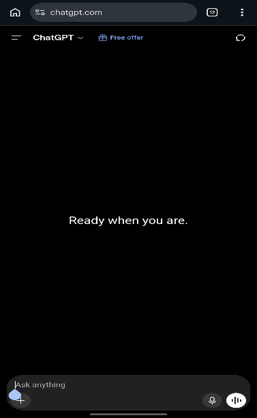
The ChatGPT home page includes a message box at the bottom of the screen, where you can type your request or question.
The message you enter is what called a prompt.
Step 2: Sign in or create an account
Follow the available instructions to create an account or sign in
You may be offered different signing methods depending on the type of device and region.
Step 3: Find the message box
The message you enter is called a prompt.
A prompt can be:
· A question
· An instruction
· A description
· A request
· A document you want reviewed and improved
· A task you want help completing
Step 4: type your first prompt
You can begin with something simple:
Explain Artificial Intelligence in simple language.
ChatGPT will generate a response.
You can ask follow-up question:
Give me three examples of artificial intelligence used in everyday life.
You do not need to repeat the entire conversation because ChatGPT can use the context already provided within the current chat.
Step 5: review the response:
Do not assume that every answer is correct.
Read the response and ask:
· Does this answer my question?
· Are the facts accurate?
· Did it invent any information?
· Is the wording suitable for my situation
· Do I need a shorter or more detailed answer?
If the answer isn’t satisfactory, continue the conversation and explain what should change.
What is ChatGPT prompt?
A prompt is the instruction, question or information you give ChatGPT.
Prompts can be simple:
What is inflation
The can also ne detailed:
Explain inflation to a beginner who has no background knowledge of economics. Use simple language, give three everyday examples and finish with a short comparison between cost-push inflation and demand-pull inflation.
The second prompt is likely to produce a better useful answer because it explains:
· The topic
· The reader’s level
· The desired language
· The examples required
· The preferred structure
A good prompt does not have to be long, it needs to be clear.
A simple formula for writing better prompts
A useful beginner prompt can include five elements:
1. The task
The ChatGPT what you want it to do.
Example:
· Explain
· Rewrite
· Create
· Compare summarise
· Review
· Analyse
· Plan
· Brainstorm
2. Context
Explain the situation
For example:
“I am applying for my first project officer job.”
This helps ChatGPT understand why you need the answer.
3. The audience
State who the content is for.
Example:
“Write for someone who has no technical background.”
4. Desired output
Explain what the answer should look like.
For example:
“Give me a step-by-step guide with examples.”
5. The constraints
Mention anything ChatGPT should avoid or include
For example:
Keep it under 500 words. Use simple English. Do not create qualifications
Putting these elements together gives a strong prompt:
“Help me write a professional application email for my first project officer job. The email will be sent to a hiring manager. Mention that my CV is attached, but do not invent qualifications or experience. Use simple professional English and keep the message under 150 words.”
Weak prompt versus strong prompt
Consider the following prompts:
Write a CV
ChatGPT does not know:
· Who the CV belongs to
· Which position is being applied for
· What experience they have
· Which country or industry they are targeting
· Whether they are a graduate or an experienced professional
· What format they want
A stronger prompt would be:
“Help me improve my CV for an entry-level monitoring and evaluation position. I have a Bachelor’s degree and experience in data collection. Excel, stakeholder engagement and report writing. Do not invent achievements. Start by giving me a strong professional summary of no more than 80 words.”
The stronger prompt gives ChatGPT enough information to produce a relevant answer.
How to improve a ChatGPT answer
Your first prompt does not need to produce the perfect answer.
You can improve the response through follow-up instructions.
Follow-up prompts include:
· Explain that more simply.
· Give me a practical example.
· Make the answer shorter.
· Add more detail to step three.
· Turn this into a checklist.
· Rewrite it in a more professional tone.
· Remove repetitive information.
· Do not use technical jargon.
· Identify any facts that need verification.
· Give me three different versions.
· Ask me questions before producing the final answer.
Think if the process as working with an assistant. You provide direction, review the result and request improvements.
Final thoughts
That's all there's to ChatGPT, no manual required, just a bit of practice. The more you use it, the more natural it will feel and the faster you will find the ways it fits into your own work and routine.
Call to action
With you knowing how to use ChatGPT, here's the part most people skip. The way you ask makes all the difference, the prompting part.